

Chances are your domain is being spoofed right now and you have no idea.
DMARC (Domain-based Message Authentication, Reporting, and Conformance) is the email authentication standard that lets you tell the world how to handle mail that fails SPF or DKIM checks from your domain. The important part that most people skip: it generates detailed reports on every piece of mail — legitimate or not — that claims to come from your domain.
Those reports go to an email address you specify in your DNS. They arrive as XML attachments. They are completely unreadable by humans.
That’s where parsedmarc comes in.
What parsedmarc actually does
parsedmarc is an open-source Python tool that:
- Watches an IMAP mailbox for incoming DMARC report emails
- Parses the XML and JSON attachments
- Enriches the data with GeoIP information
- Ships everything to Elasticsearch
- Provides a Kibana dashboard so you can actually see what’s happening
The result: a real-time view of who is sending mail as your domain, from where, and whether it’s passing authentication.
The stack
I’m running the parsedmarc-dockerized project by patschi, which packages the whole thing into a single docker-compose file:
- parsedmarc — the parser, watching an IMAP mailbox on my mail server
- Elasticsearch 8.12 — stores all parsed report data (single-node, 2GB heap)
- Kibana 8.12 — visualizes it with a pre-built dashboard
- nginx — reverse proxy with SSL in front of Kibana
- geoipupdate — keeps the MaxMind GeoIP database current
The whole thing runs internally — Elasticsearch and Kibana are not exposed to the internet, only accessible through the nginx proxy on the LAN.
Getting it running
The setup is straightforward if you have Docker and a dedicated IMAP mailbox for DMARC reports.
First, point your DMARC DNS record at a mailbox:
_dmarc.yourdomain.com TXT "v=DMARC1; p=quarantine; rua=mailto:dmarc@yourdomain.com; ruf=mailto:dmarc@yourdomain.com; fo=1"Then clone the repo and configure:
git clone https://github.com/patschi/parsedmarc-dockerized /opt/parsedmarc-dockerized
cd /opt/parsedmarc-dockerized
Edit data/conf/parsedmarc/config.ini with your IMAP settings:
[general]
save_aggregate = True
save_forensic = True

[mailbox]
watch = True
archive_folder = Processed
delete = False

[imap]
host = your.mailserver.com
port = 993
ssl = True
user = dmarc@yourdomain.com
password = yourpassword

[elasticsearch]
hosts = elasticsearch:9200
ssl = False
If you want GeoIP enrichment (you do), sign up for a free MaxMind account, get a license key, and add it to geoipupdate.env.
Then:
docker-compose up -dFirst startup takes a few minutes while Elasticsearch initializes. Once healthy, parsedmarc starts processing whatever is in the mailbox and watching for new reports.
What you’ll see
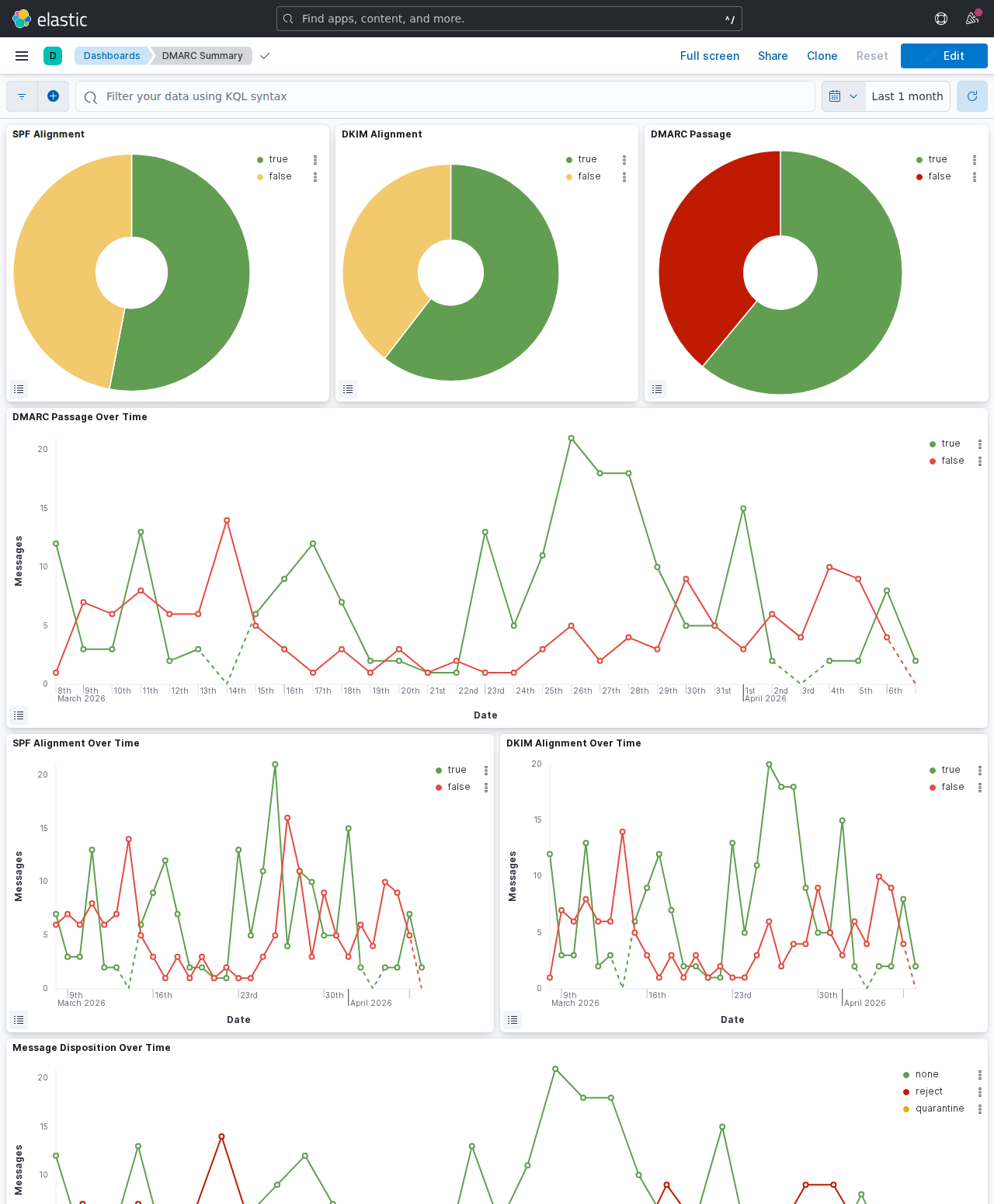
The pre-built Kibana dashboard shows:
- Volume of reports over time
- Pass/fail breakdown by source IP
- Geographic map of sending sources
- Which organizations are sending as your domain
- SPF and DKIM alignment status per source
- Forensic reports on individual failing messages
When I first set this up I immediately saw a handful of IPs in eastern Europe sending mail that claimed to be from my domain. They were failing DMARC (good — my policy is p=quarantine), but without this dashboard I never would have known.
A note on resources
Elasticsearch is hungry. The 2GB heap setting in the compose file is the minimum that doesn’t cause constant GC pressure. On a machine with plenty of RAM it runs fine. On a low-memory VPS, you’ll want to tune ES_JAVA_OPTS down and accept slower query performance.
The bottom line
If you run your own domain and don’t have DMARC reporting set up, you’re flying blind. Setting this up took me an afternoon and now I have a permanent window into exactly what’s happening with my domain’s email reputation. The parsedmarc-dockerized project does all the heavy lifting — you just need an IMAP mailbox and a machine with Docker.
Free alternatives
If you don’t want to self-host the full ELK stack, there are hosted options that parse your DMARC reports for free:
- Postmark DMARC — free email digest with weekly summaries, no account required
- DMARC Analyzer (Mimecast) — free tier with basic reporting and policy guidance
- Dmarcian — free tier for small domains, solid visualization and alignment detail
- EasyDMARC — free tier with a clean dashboard, good for getting started
- Google Postmaster Tools — free if you send significant volume to Gmail, focuses on reputation and delivery
The trade-off: hosted tools send your aggregate report data to a third party, and free tiers typically retain only 7–30 days of history. Self-hosting keeps the data yours indefinitely.