
I know what good software engineering looks like. I’ve been doing this for decades. But as a solo developer, I sometimes skip the process and rely on gut instinct and experience instead. On a team, there’s a code review before you merge. There’s a QA pass before you ship. There’s someone who asks “did you check the security on that?” When you work alone, there’s nobody.
gstack is the somebody.
It’s a skill framework for AI coding agents, built by Garry Tan. I use it with Claude Code across seven machines and every project I touch. This post is about what it actually catches, why I forked it, and why the ethos behind it matters more than the tooling.
The ethos
The key insight from Garry’s ETHOS.md is that AI makes the marginal cost of completeness near-zero. The last 10% that teams used to skip? It costs seconds now. So do the complete thing. Every time.
That resonated with me because I know what “the complete thing” is. I just don’t always do it. Not because I don’t care, but because when you’re the only one on the project and it’s 11pm and the fix works… you skip the security review. You skip the test. You tell yourself you’ll come back to it. You won’t.
gstack makes the discipline automatic. Not by nagging, but by encoding the process into structured workflows that run as part of the build.
What it is
gstack ships as a set of prompt-engineered workflows that plug into Claude Code (and Codex, Gemini CLI, and others). Each skill is a structured methodology: /investigate doesn’t just debug, it enforces four phases (investigate, analyze, hypothesize, implement) and an iron law (no fixes without root cause). /ship doesn’t just push code, it detects the base branch, runs tests, reviews the diff, bumps the version, updates the changelog, and creates the PR.
There are 46 skills covering the full development lifecycle:
- Ideation:
/office-hoursruns a YC-style diagnostic on your idea - Planning:
/plan-ceo-review,/plan-eng-review,/plan-design-revieweach review a plan from a different angle - Building:
/investigatefor bugs,/design-consultationfor design systems,/browsefor headless browser automation - Quality:
/qatests and fixes,/csoruns OWASP Top 10 + STRIDE security audits,/reviewdoes pre-landing code review - Shipping:
/shiphandles the full PR workflow,/canarymonitors production after deploy
What it actually catches
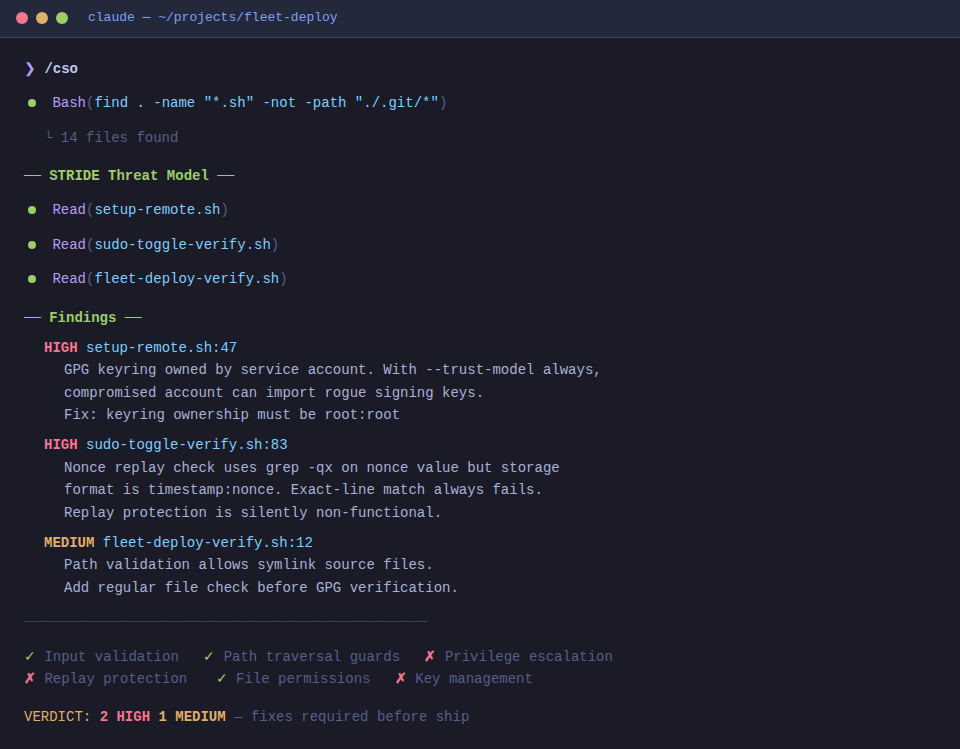
This is the part that convinced me. These are real findings from /cso running against my own projects.
GPG keyring ownership (fleet management tools)
I wrote a fleet deployment system that signs scripts with GPG before distributing them to remote machines. The verification keyrings on the target machines were owned by the service account. That looks fine until you think about it: with --trust-model always, any key in that keyring is trusted. If the service account is compromised, the attacker can import their own signing key and deploy whatever they want. The fix is simple: keyrings should be root:root. I would not have caught that on my own.
Silent nonce replay (fleet management tools)
I implemented nonce-based replay protection for privileged operations. Nonces were stored as timestamp:nonce but the lookup used grep -qx matching against just the nonce value. Because grep -qx requires an exact full-line match, the check silently passed every time. The replay protection looked correct, logged correctly, and did absolutely nothing.
Database privilege escalation (trading system)
My portfolio trading system was using my personal MariaDB user with god-mode privileges. It worked, it was convenient, and it meant that a bug in the trading app had full database access including the ability to drop every other database on the server. /plan-eng-review flagged it and required a dedicated least-privilege user as a setup prerequisite.
These aren’t hypothetical OWASP exercises. They’re real bugs in code I wrote, reviewed, and deployed. The GPG keyring issue is a design flaw you’d never think about until someone points it out. The nonce bug is the worst kind: a security check that looks correct and silently does nothing. I have decades of experience and I missed all three.
Why I forked it
The upstream repo at github.com/garrytan/gstack is designed for Garry’s workflow. My fork at github.com/kshartman/gstack adapts it for mine. The fork stays in sync with upstream (I merge regularly) but adds:
Multi-machine deployment. I run gstack on seven machines (cs, dev, xt, ws, trex, lakedev, plus my local workstation). The fork’s install script handles remote deployment over SSH, installs dependencies, and logs every deployment. One command updates all machines: ./install -y --host cs.
Token budget management. Claude Code allocates 2% of its context window for skill descriptions. With 46 skills, the raw descriptions blew past that budget and Claude was dropping 52 of them after context compaction. My fork auto-truncates descriptions at generation time (22K chars down to 7.5K) and auto-injects routing triggers extracted from the full descriptions, so nothing gets lost.
Fork-aware upgrade checks. Upstream uses a simple version check. My fork distinguishes between “upstream moved ahead” and “your fork has updates you haven’t pulled” so I’m never confused about which direction to update.
Local-only telemetry. Upstream gstack has optional telemetry that can phone home. Rather than trust a config toggle, my fork strips the remote telemetry path entirely. Skill usage data stays in local JSONL files under ~/.gstack/analytics/ and never leaves the machine. When your tools touch trading systems and fleet credentials, “telemetry is off by default” isn’t good enough. “Telemetry can’t leave” is.
The fork never modifies upstream template files. All changes happen in the generator (gen-skill-docs.ts), the install script, and test fixtures. Upstream merges are clean.
How I actually use it
I use gstack across everything I build: system tools and fleet management utilities, a portfolio trading system, and client projects. The skills adapt to the domain because they encode process, not technology assumptions.
Typical flow:
/office-hours → /plan-eng-review → build → /qa → /cso → /ship
For the trading system, /cso is non-negotiable: API keys, credential storage, input validation on market data, rate limiting. The security audit runs on every change, not just at ship time.
For client work, /autoplan gives me a full CEO, design, eng, and DX review in one command. Every deliverable gets the same rigor whether the budget is tight or not.
/investigate is the skill I reach for most. It enforces the discipline I’d skip under time pressure: no jumping to fixes before you have a root cause. The four-phase structure means I actually understand what broke before I change anything.
The skill catalog
I built a skill catalog that shows every skill with its full upstream description, triggers, and usage flows. It’s generated from the same template files that produce the skills, so it’s always current. The cheat sheet at the top is the quick reference; the full catalog below has Garry’s original descriptions with all the context and nuance.
The numbers
From Garry’s compression table, which matches my experience:
| Task type | Human team | AI + gstack | Compression |
|---|---|---|---|
| Boilerplate / scaffolding | 2 days | 15 min | ~100x |
| Test writing | 1 day | 15 min | ~50x |
| Feature implementation | 1 week | 30 min | ~30x |
| Bug fix + regression test | 4 hours | 15 min | ~20x |
| Architecture / design | 2 days | 4 hours | ~5x |
The skills don’t write better code than a senior engineer. They enforce the process a senior engineer would follow if they had unlimited patience: always review, always test, always check security, always write the changelog. The AI has unlimited patience. The skill framework makes sure it uses it.
Links
- Upstream: github.com/garrytan/gstack
- My fork: github.com/kshartman/gstack
- Skill catalog: cs.bogometer.com/gstack
- Builder ethos: ETHOS.md